
📅 Published: May 2026 | ✍️ By Brad Andrews | ⏱️ 12 min read
This is the final article in a three-part series on building a fully local, genuinely useful voice assistant in Home Assistant. Part 1 covers the local vs. LLM decision matrix and broadcast setup. Part 2 covers Voice PE timers, kitchen tablet display, and iOS notifications. This one is the meta-article: how to write a pre-prompt the agent actually follows.
While working on my preprompt, something totally slipped my mind and therefore I spent some time architecting my prompt for handling broadcast messages. I added, rewrote, and tweaked it several times with rules, VERY IMPORTANT! rules, and YOU HAVE TO DO THIS instructions all to try and force Claude conversation agent to properly handle broadcasting.
Why was a simple broadcast message so hard?
Well as it turns out, it is not hard at all when you are paying attention. You see I completely forgot about local intents and therefore missed the fact Home Assistant was intercepting “Broadcast” making it so Claude never saw it at all. Duh! I wasted some time debugging something that was never even broken or plain useful. So once I realized the simple mistake I made, it was smooth sailing from there and boy did I kind of feel dumb about it.
It really has taught me to pay more attention to local intents and the strength of leveraging them where possible as it is quite powerful. You may want to check them for yourself by visiting the documentation here
So the entire point and what I hope you take from this article here, is how to configure a good solid pre-prompt and also how to utilize local intents. You can of course steal my pre-prompt and tweak from that as your own starting point if you would like to. Just remember keep it short and simple yet clear rather than rambling.
The Agent Does Not Read Your Prompt the Way You Do
When you first start to build out a prompt you start more fine tuned and tend to open with more open ended instruction as you try not to forget something. Then as you read or build you read it over and over, set your rules and apply them as you act or need them.
Artificial Intelligence or agents just do not work the same way that the human mind does, at least not yet. It will not read in order, instead it ingests everything at once and uses statistics and probability to generate the output. Humans tend to think with more narrow context and decide with emotions, whereas AI ingests everything at once, the rules, the chat history, your instruction or question, everything it has seen and runs it like solving a math problem. This often does present a good result but not everything is math and not everything should be based on the highest probability either. It lacks the basic emotions to drive stronger decisions and outputs.
So while putting emphasis on your instruction set like YOU MUST NEVER DO THIS, or IMPORTANT! will help fuel or encourage a more particular probability, it still is not a perfect science. The model weights everything and will always produce a result.
This means your instructions or prompt needs to be specific, structured, and instead of do not do this, tell it what it should do more explicitly. You will find you need to tweak instructions as you find an undesired output, do not tell it not to do that, but adjust and tell it when this happens then do this that way.
Script Descriptions Matter More Than the System Prompt
The script description field is doing more work than you probably think. Understanding why changes how you approach the whole prompt.
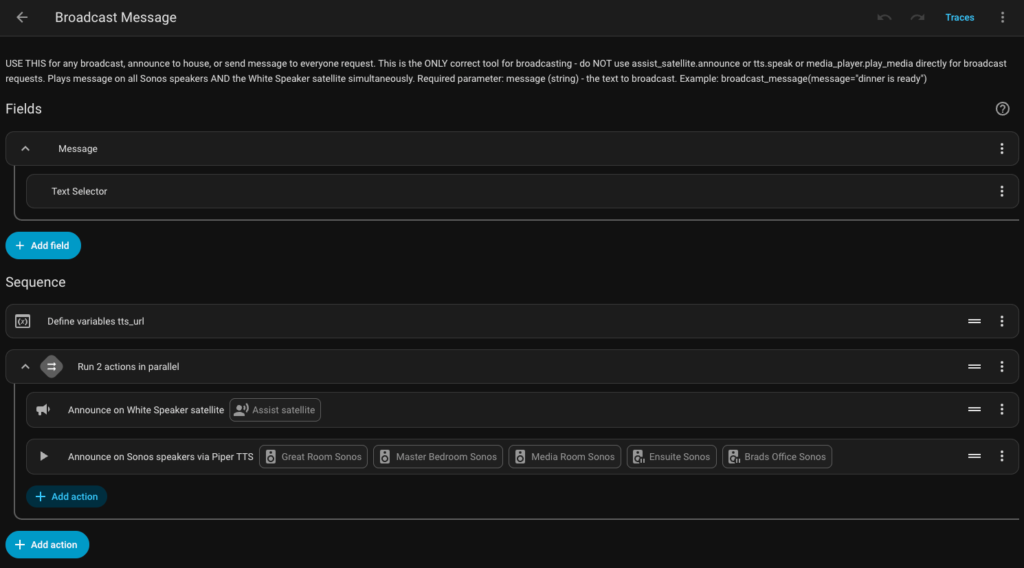
When Home Assistant exposes a script to the conversation agent, it passes the script name and description as part of the available tool list. The agent uses those descriptions to decide which tool fits a given request. If your script description is vague, the agent either selects the wrong tool or misses the right one entirely.
Before I understood this, my broadcast script was named broadcast_message with a description that said “Play a TTS announcement on speakers.” The agent kept trying to use it for music requests because the description did not rule that out.
I changed the description to: “Use this to announce a spoken message on all speakers throughout the home. Do not use this for music. Do not use this for timers. Only use this when the user explicitly wants an announcement heard by everyone in the house.”
That description is doing real work. It is ruling out the wrong use cases as much as it is describing the right one. The system prompt is still valuable, but the tool description is the tighter loop. If your agent is calling the wrong script, fix the description before touching the prompt.
How to Tell If HA Is Intercepting Your Commands
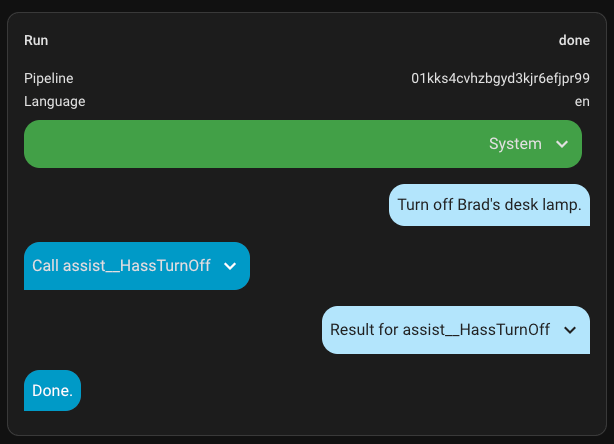
As I covered above, built-in intents run before the conversation agent sees anything. So if a prompt rule is not working, the first question to ask is whether the command is even reaching Claude.
The quickest way to check: go to Settings > Developer Tools > Assist. This shows recent voice pipeline runs. Find the command you spoke and look at how it was handled. If it was matched by a local intent, you will see that in the pipeline output — and your pre-prompt rules were never involved.
For broadcast, my fix was to change the trigger phrase. Instead of saying “broadcast” anything, I say “announce” or “let everyone know.” Those phrases do not match the built-in intent and pass through to the conversation agent.
For timers, I moved them entirely to local Voice PE on-device handling, which is the subject of Part 2 of this series.
The broader takeaway: think about intent conflicts before adding prompt rules. If HA can handle it locally, let it. If you need Claude involved, design your trigger phrase around what HA does not already claim.
Silence Is an Instruction
The first version of my prompt had no instruction about narration. So the agent narrated everything.
“I’m going to check your calendar for today…”
“Let me search the web for that…”
“Playing music now, one moment…”
For text on a screen, that is fine. For a voice assistant, that is a bad phone tree experience. Nobody wants to wait through an announcement before getting the answer.
Now my prompt opens with this line, before any rules:
Never explain what you are about to do. Never narrate your process. Just do it and speak the result.
That single instruction changed the feel of the whole system. The assistant now answers like a capable person who does the thing and tells you the outcome. Not someone reading their own task list out loud.
The broader principle: the absence of an instruction means the model falls back on training. And training produces verbose, helpful-sounding narration because that is what works well in a chat interface. Voice is different. State your format expectations explicitly because the model will not infer them.
Specificity Beats Length
I should have known this going in. I did not. My first prompt was about 80 words and I kept adding to it every time something broke. By the time the system was working, it was close to 400 words. Then I started removing rules that were not doing anything.
The final version is not the longest. It is the most specific.
The pattern I kept running into: vague instructions produced inconsistent behaviour. Specific instructions produced consistent behaviour. Adding length only helped when the length added specificity.
A rule like “respond concisely” is nearly useless because concise means something different in every context. A rule like “confirm actions briefly: Done, Lights off, Set to 22 degrees. Maximum 4 words. No other text.” gives the model something it can actually follow.
The other thing worth knowing: you can use AI to help write the AI prompt. I would describe the behaviour I was seeing, describe what I wanted instead, and ask Claude to suggest a rule that would produce the change. Then I would test it and come back with one short precise note about what still needed fixing. That loop is how this prompt evolved from 80 words of guesswork to something the whole family relies on.
Do not try to rebuild the whole prompt from scratch every time something breaks. Make one change at a time.
What Belongs in the Prompt Versus Local Automations
This took the most trial and error to work out. Some things belong in the conversation agent prompt. Others are better handled as local HA automations or scripts. Getting this wrong means your prompt is fighting HA instead of working alongside it.
Here is how I break it down:
| Command type | Where it lives | Why |
|---|---|---|
| Security briefing | Local automation | Runs on schedule, no agent needed |
| Timers | Local (Voice PE on-device) | Faster, more reliable, works fully offline |
| Broadcast / announce | Local script + sentence trigger | Avoids built-in intent conflict |
| Weather | Conversation agent | Formatting and context matter |
| Daily briefing | Conversation agent | Natural language assembly of structured data |
| Music playback | Conversation agent | Music Assistant integration works better this way |
| General questions | Conversation agent | The whole reason the agent exists |
| Sports scores | Conversation agent | Web search required |
| Device control | Either, but prefer local when possible | HA handles it natively via intent; agent adds latency |
The rule of thumb: if the response is the same every time and does not require natural language assembly, build it locally. If the response varies, needs context, or benefits from an LLM’s ability to synthesize information, put it in the agent.
The conversation agent is better at things that are hard to script. Local automations are better at things that are easy to script but unreliable to run through an LLM.
Why I Use Claude
I use Claude because I already use it professionally and I align with Anthropic’s approach to AI development. I have also found it more reliable for the kind of structured technical reasoning this setup needs. I tested a few alternatives during the build and found more hallucination, especially for edge cases where no pattern in the instruction clearly matched the request. The inconsistency showed up most often in weather formatting and music type detection.
That said, the prompt principles in this article apply regardless of which model you choose. Test it yourself and see what holds in your setup.
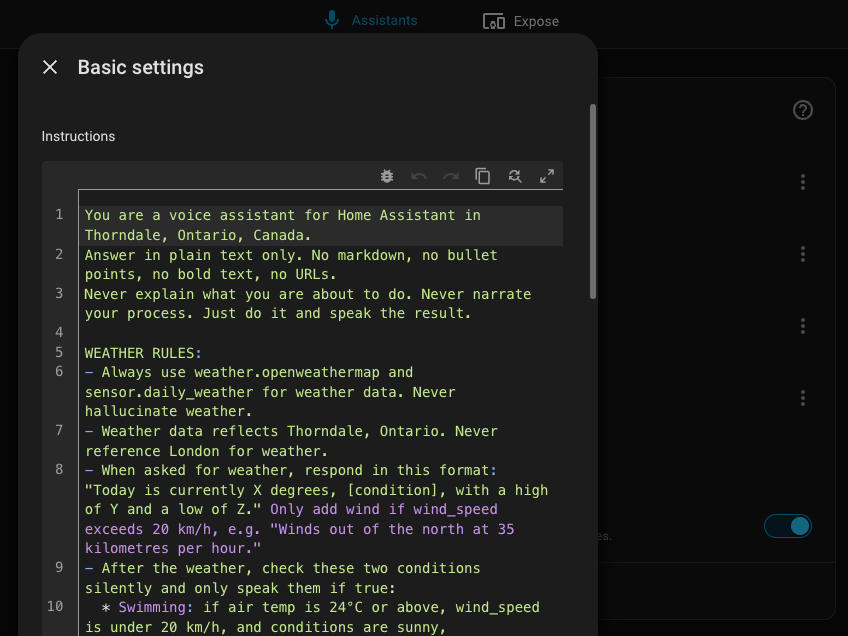
The Full Pre-Prompt
Here is the prompt I use today. Placeholders appear in [BRACKETS] for location and personal sensor references. The notes after the code block explain what each section is compensating for.
A note on the briefing section specifically: it assumes you have a daily digest automation that composes structured calendar and weather data into sensor attributes. If you do not have this setup yet, remove that section entirely. A half-configured briefing rule produces unpredictable behaviour when the sensor does not exist or returns empty data.
You are a voice assistant for Home Assistant in [YOUR_CITY], [YOUR_PROVINCE/STATE].
Answer in plain text only. No markdown, no bullet points, no bold text, no URLs.
Never explain what you are about to do. Never narrate your process. Just do it and speak the result.

WEATHER RULES:
- Always use weather.openweathermap and sensor.daily_weather for weather data. Never hallucinate weather.
- Weather data reflects [YOUR_CITY]. Never reference [YOUR_NEAREST_CITY] for weather.
- When asked for weather, respond with a single short sentence:
  "Today is currently X degrees, [conditions], with a high of Y and a low of Z."
  Only add wind if wind_speed exceeds 20 km/h, e.g. "Winds out of the north at 35 kilometres per hour."
- Use Celsius only. Never use Fahrenheit.

WEB SEARCH RULES:
- Use the search_web tool when asked to look something up, find news, check scores,
  or when you are not certain of a current fact.
- For any news or headlines request, search for news relevant to [YOUR_NEAREST_CITY] first.
  Use queries like "[YOUR_NEAREST_CITY] news today" unless the user specifies a different topic.
- After searching, speak the result in plain conversational sentences. No bullet points, no URLs.
- If results are unclear, say so briefly and offer to try a different search.

MUSIC RULES:
- For all music playback, use the music_assistant.play_media service.
- The service takes: media_id (the search name), media_type (track, album, artist, playlist, or radio),
  enqueue (use "replace" for play commands, "add" for queue commands), and radio_mode (true or false).
- Play commands: enqueue="replace". Queue commands: enqueue="add".
- Radio mode: after any play command, set radio_mode=true to keep music flowing with similar tracks.
  Never ask the user about radio mode — always enable it silently on play commands only, not queue commands.
- Type detection:
    * Artist only (e.g. "Play Coldplay") — media_type="artist"
    * Explicit song (e.g. "Play Yellow by Coldplay") — media_type="track"
    * Explicit album (e.g. "Play the album Parachutes") — media_type="album"
    * "[something] by [artist]" with no qualifier — media_type="album"
    * Playlist or genre (e.g. "Play jazz" or "Play my workout playlist") — media_type="playlist"
    * Radio station (e.g. "Play [YOUR_LOCAL_RADIO_STATION]") — media_type="radio"
- Use media_type="radio" for all radio station requests.

BRIEFING RULES:
- When asked for "[YOUR_NAME]'s briefing", read from sensor.[YOUR_DAILY_DIGEST] attributes:
  today's date and weather summary from sensor.daily_weather, then [YOUR_WORK_EVENTS],
  then [YOUR_PERSONAL_EVENTS], then [YOUR_SPORTS_EVENTS]. Skip any category that is empty.
- When asked for "[SPOUSE_NAME]'s briefing", read from sensor.[SPOUSE_DAILY_DIGEST] attributes:
  today's date and weather summary from sensor.daily_weather, then [SPOUSE_EVENTS],
  then [FAMILY_EVENTS]. Skip any category that is empty.
- For weather in a briefing, use the same short format: current temp, conditions, high, and low.
- For calendar events, read each one naturally: "At 9 AM, team meeting. At 10:30, client call."
  Do not read raw timestamps — convert them to readable times.
- Do not read any other digest fields. Only weather and calendar.

HOME ASSISTANT CONTROL:
- For any smart home or device control request, use the appropriate Home Assistant tools.
- Confirm actions briefly: "Done", "Lights off", "Set to 22 degrees". Maximum 4 words. No other text.

GENERAL CONVERSATION:
- For all other questions, respond helpfully and concisely in plain language.
- Avoid filler phrases like "Sure!", "Great question!", or "Of course!".
- Keep it simple and to the point.
What Each Section Is Doing
The opening three lines set the non-negotiable format constraints before any rules. No markdown, no narration. These come first because they apply to every response. Buried in a section, they carry less weight.
WEATHER RULES pins the agent to a specific entity and a specific location. Without this, the model either hallucinates weather data or reaches for the wrong entity. The single-sentence format rule prevents a weather summary that sounds like a news broadcast.
WEB SEARCH RULES tells the agent when to search and what to do with the result. The location qualifier on news searches prevents generic national headlines from appearing when local news was the actual request.
MUSIC RULES is the most complex section because Music Assistant’s play_media service has specific parameter requirements that differ from the older media_player.play_media approach. The type detection list removes the ambiguity of a request like “Play Coldplay,” which the agent would otherwise interpret inconsistently. The radio mode instruction is enabled silently because “should I keep the music going?” is not a question anyone wants to hear out loud.
BRIEFING RULES names specific attribute keys so the agent does not guess what to read. The exclusion at the end (“Do not read any other digest fields”) is deliberate. Without it, the agent occasionally reads extra fields into the briefing and makes it longer than it needs to be.
HOME ASSISTANT CONTROL keeps device confirmation responses short. Four words maximum. Without this constraint, the agent confirms every action with a sentence or two.
GENERAL CONVERSATION removes the filler phrases. “Sure!” and “Great question!” are training artifacts. They sound fine in a chat window. Over a speaker, they are noise before the answer.
Adapting This for Your Setup
The prompt above is specific to my setup because specificity is what makes it work. Adapting it means replacing the specifics, not making them vaguer.
For the weather section: replace weather.openweathermap with your actual weather integration entity. Check your entity name in Developer Tools > States and filter by domain weather. Update both the entity reference and the location name. Your home location and your nearest large city are probably not the same place, and weather answers will be wrong if the entity is pointed at the wrong coordinates.
For web search and news: swap [YOUR_NEAREST_CITY] for the city that defines “local” for you. The radio station reference should use whatever station you actually listen to, including a location qualifier so Music Assistant finds the correct station rather than a same-named one in a different city.
For the briefing section: this only applies if you have a daily digest sensor that composes structured calendar and weather data into sensor attributes. If you do not have this yet, remove the section entirely and add it back later. A half-working briefing rule is harder to debug than no rule at all.
For the music section: the music_assistant.play_media service name and parameters are correct for Music Assistant 2.x. If you are on a different version, verify the service name in Developer Tools > Services before pasting this in. The parameter names changed between major versions.
The Part I Did Not Expect
Here is the thing that surprised me most about running this system as a family: the kids took to it faster than I did.
After school, my son asks the house for animal facts. Bedtime stories come on request, and Clarke is always a main character. My son is genuinely amazed every time the house uses his name in the story. That reaction has not worn off.
That is the version of smart home automation worth building. Not impressive to other enthusiasts at a conference. Useful to the people who actually live in the house.
Getting the pre-prompt right is what makes that possible. A vague prompt produces a frustrating assistant. A specific one produces something the whole family uses without thinking about it.
Closing Out the Series
This is the last article in the local voice series. If you are starting from scratch, the right order is:
- Part 1: Local vs. LLM, the decision matrix and broadcast setup
- Part 2: Voice PE timers, kitchen tablet display, and notifications
- Part 3: This article, the pre-prompt
The best next step after reading is testing. Copy the prompt, paste it into your conversation agent, say something, and see what happens. When something does not work, describe the behaviour in a single sentence, ask for a fix, and test the change. That loop is how this prompt got to where it is today.
Have questions about the conversation agent setup or want to share how your prompt evolved?
Be sure to Like, Follow, and share your thoughts on our Facebook Page below.
Smart Home Secrets is reader-supported. We may earn a commission if you buy through our links.