
📅 Published: April 2026 | ✍️ By Brad Andrews | ⏱️ 11 min read
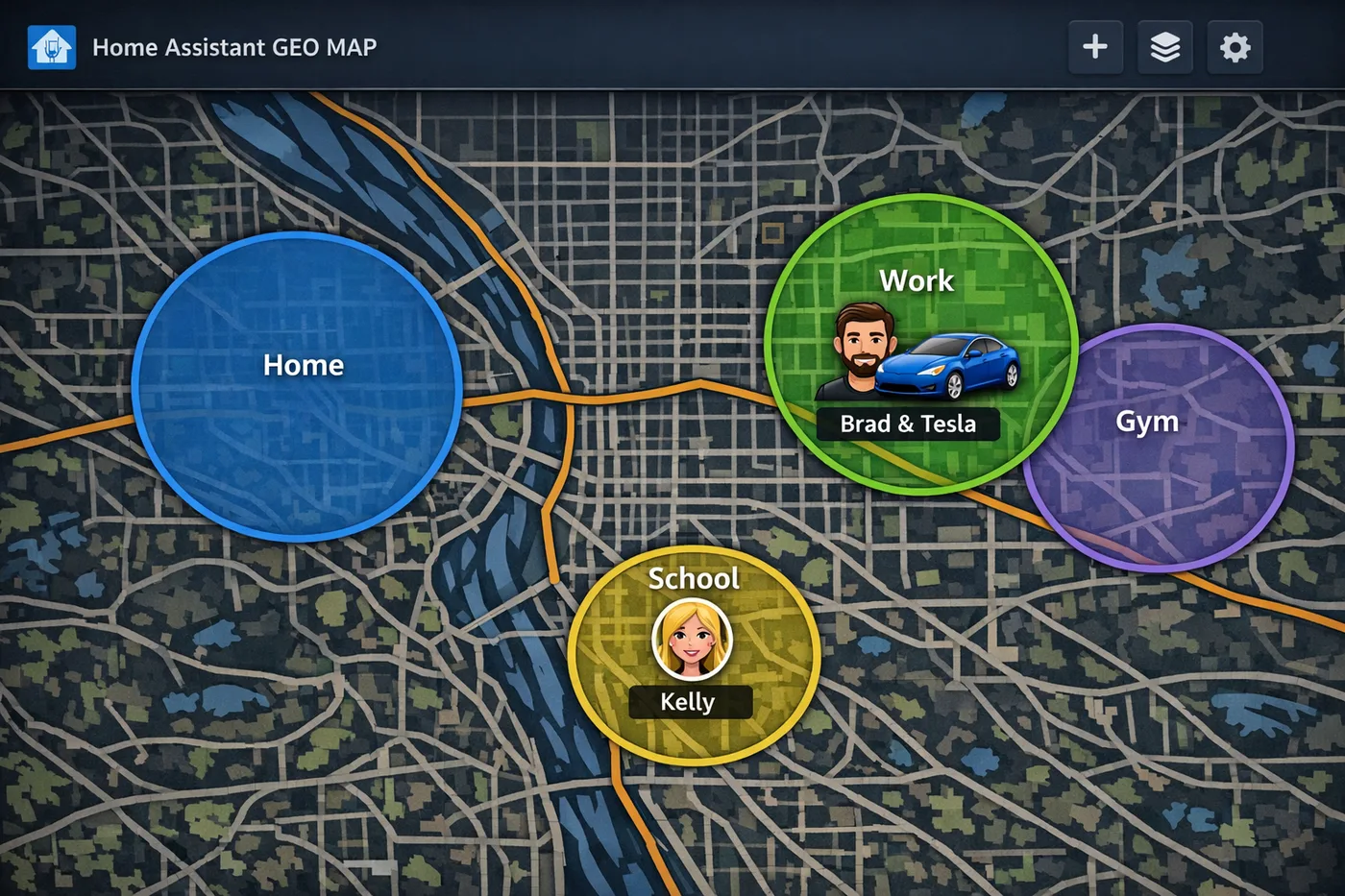
Phone GPS is a great foundation for presence detection in Home Assistant. It is not a complete solution.
A phone in a car driven by someone else will look like you arriving home. A phone left on the kitchen counter will tell your house you are still there when you walked out the door. A babysitter, a houseguest, or your kids arriving home from school will register as nobody home if your automation only knows about two people.
This blueprint is about building past those failure points. We will cover phone-based geofencing as the baseline, mmWave sensors for room-level presence, UniFi cameras for outdoor detection, car-specific conditions that prevent false arrivals, a guest mode helper for when someone is home but neither adult is, and a coming addition: license plate detection to double-confirm which vehicle is actually in the driveway.
By the end, your home will know not just whether someone is present, but who, how, and in what context.

Layer 1: The HA Companion App. Your Baseline
The Home Assistant Companion App is the starting point for every presence detection setup. Once installed on your phone and granted location access, it creates a person entity in HA that updates as you move in and out of your defined zones.
If you have not set up your home zone and added yourself as a tracked person yet, start with Blueprint #2: Zones and Geofencing before continuing here.
The Companion App does two things that make it a strong baseline. First, it uses a combination of GPS, WiFi, and cell tower data to determine your location, which gives it more accuracy than raw GPS alone. Second, it reports state changes in near real time rather than on a polling schedule. When you pull into your street, HA knows within seconds.
The weakness is context. Your phone being home is all it sees. It does not know if you are the one holding it.
Layer 2: mmWave Sensors. Room-Level Presence
Motion sensors lie. Step out of range for thirty seconds and the light turns off on you. mmWave radar sensors solve this problem. They detect the micro-movements of a human body at rest: sitting still at a desk, lying in bed, watching TV. Presence stays detected even when nobody is moving.
I use mmWave sensors in the kids’ rooms and the playroom specifically because of a simple parenting reality: kids leave lights on. Not sometimes. Every time. A standard motion sensor will time out and shut the lights off mid-play or mid-sleep and trigger a complaint. An mmWave sensor keeps the lights on as long as anyone is actually in the room, and turns them off the moment the room is truly empty.
The sensors expose a binary_sensor in Home Assistant. When presence is detected, the sensor is on. A clear room flips it to off. Automating lights against that is straightforward.
yaml
alias: "ROOMNAME Lights Off. No Presence"
description: >-
  Turns off ROOMNAME lights when mmWave presence sensor has been clear
  for 5 continuous minutes. Condition prevents the automation running
  if the lights are already off.

triggers:
  - platform: state
    entity_id: binary_sensor.ROOMNAME_mmwave_presence
    to: "off"
    for:
      minutes: 5

conditions:
  - condition: state
    entity_id: light.ROOMNAME_light
    state: "on"

actions:
  - action: light.turn_off
    target:
      entity_id: light.ROOMNAME_light

mode: single
Placeholders to replace:
ROOMNAMEwith your room name as it appears in entity IDs- Adjust the
for: minutesdelay to suit the room. I use 5 minutes for bedrooms and the playroom
The switches I run are the Inovelli VZW32-SN Red Series mmWave Presence Dimmer Switch (Z-Wave). These are not standard dimmers with an external sensor bolted on. The mmWave radar is built directly into the switch housing, sitting flush in the wall like any other switch. Nothing to mount separately and no additional devices on your Z-Wave network.
The VZW32-SN exposes its presence state as a binary sensor in Home Assistant alongside the standard dimmer controls. You get light control and room-level presence detection from a single wall box. The LED bar on the switch can also be configured to reflect presence state or room occupancy, which makes for a useful at-a-glance indicator.
Decoupling Presence from Light Control
Presence detection and light control can be decoupled on these switches if you want. That means you can use the presence detection to drive automations independently of whether the switch is turning lights on and off directly. In my setup the switch controls the light, and HA uses the presence sensor for automations that extend beyond just that room’s light.
If you want to go the standalone sensor route instead, other popular options include the Aqara FP2 and various Apollo Automation MSR-2 sensors from the community, both of which integrate cleanly with Home Assistant.

Layer 3: Car-Specific Arrival Detection
This is where presence detection gets genuinely interesting, and where a lot of setups have a gap.
The problem: when Kelly’s phone arrives home, HA sees person.SPOUSENAME enter the home zone. But that only tells me her phone is here. It does not tell me she was driving. She could be a passenger in a friend’s car, or riding in my Tesla. If she is a passenger and not the driver, opening her garage door automatically would be a false trigger at best and a security issue at worst.
The same problem applies in reverse. If I am a passenger in someone else’s car and we pull up outside, my phone crosses the home zone boundary and my garage door opens for no reason.
The solution is to combine the person’s zone entry with additional Companion App sensor conditions that confirm they were actually driving their own vehicle.
Kelly’s Garage Door Automation
Kelly drives an SUV with Apple CarPlay. Two conditions confirm she is driving: her phone’s activity sensor must show Automotive for at least five minutes, and her audio output must be CarPlay. A phone in someone else’s car will not be connected to CarPlay. A phone in my Tesla will not show CarPlay since Tesla does not support it.
yaml
alias: "SPOUSENAME Driving Home. Open SPOUSENAME Garage Door"
description: >-
  Opens SPOUSENAME's garage door when SPOUSENAME arrives home, but only
  if SPOUSENAME has been in automotive activity for at least 5 minutes
  AND is connected to CarPlay, confirming SPOUSENAME is driving their
  own SUV rather than arriving as a passenger.

triggers:
  - platform: state
    entity_id: person.SPOUSENAME
    to: home

conditions:
  # Garage door must actually be closed
  - condition: state
    entity_id: cover.SPOUSENAME_garage_door
    state: closed

  # Must have been in automotive activity for at least 5 minutes
  # (filters out brief stops and passenger scenarios)
  - condition: state
    entity_id: sensor.SPOUSENAME_phone_activity
    state: Automotive
    for:
      minutes: 5

  # Must be connected to CarPlay, confirms driving their own vehicle
  # (Tesla does not support CarPlay, so this filters out Tesla passenger trips)
  - condition: state
    entity_id: sensor.SPOUSENAME_phone_audio_output
    state: CarPlay

actions:
  - action: cover.open_cover
    target:
      entity_id: cover.SPOUSENAME_garage_door

mode: single
Placeholders to replace:
SPOUSENAMEthroughout with your spouse’s name as it appears in entity IDscover.SPOUSENAME_garage_doorwith your spouse’s garage door entitysensor.SPOUSENAME_phone_activitywith the activity sensor from your spouse’s Companion Appsensor.SPOUSENAME_phone_audio_outputwith the audio output sensor from your spouse’s Companion App
My Garage Door Automation
My situation is different. I drive a Tesla, and the Tesla integration exposes a shift_state sensor that reports whether the car is in Drive, Reverse, Park, or Neutral. When my Tesla arrives home, shift_state will be d (Drive) or in transition. The car’s own location tracker entering the home zone is a secondary confirmation.
This is a more reliable signal than activity plus audio output because it is coming directly from the vehicle rather than the phone. If Kelly is driving the Tesla, her phone will not have the Tesla device tracker showing as home unless she is actually in it. And if I am a passenger in her car, the Tesla’s tracker won’t be moving toward home.
yaml
alias: "YOURNAME Tesla Home. Open YOURNAME Garage Door"
description: >-
  Opens YOURNAME's garage door when YOURNAME arrives home, but only
  if the Tesla is actively in Drive (confirming YOURNAME is driving
  the Tesla home rather than arriving as a passenger in another vehicle).
  Tesla device tracker entering home zone acts as secondary confirmation.

triggers:
  - platform: state
    entity_id: person.YOURNAME
    to: home

conditions:
  # Garage door must be closed
  - condition: state
    entity_id: cover.YOURNAME_garage_door
    state: closed

  # Tesla must be in Drive, confirms YOURNAME is driving the Tesla home
  - condition: state
    entity_id: sensor.tesla_shift_state
    state: d

  # Tesla device tracker must also show as home
  - condition: state
    entity_id: device_tracker.YOURNAME_tesla
    state: home

actions:
  - action: cover.open_cover
    target:
      entity_id: cover.YOURNAME_garage_door

mode: single
Placeholders to replace:
YOURNAMEthroughout with your name as it appears in entity IDscover.YOURNAME_garage_doorwith your garage door entitysensor.tesla_shift_statewith your Tesla shift state sensor entitydevice_tracker.YOURNAME_teslawith your Tesla device tracker entity
Why These Conditions Matter Together
The combination of phone zone entry, automotive activity duration, and a vehicle-specific confirmation (CarPlay or Tesla shift state) creates a three-factor check. All three must be true simultaneously. That eliminates the main false trigger scenarios: passengers, rideshares, friends dropping you off, and phones left in parked cars.
The five-minute automotive duration condition on Kelly’s automation is worth noting. A phone sitting in a stationary car in the driveway after arrival might briefly show Automotive state. Requiring five continuous minutes eliminates that edge case. By the time five minutes of driving activity is confirmed, the arrival is genuine.
Layer 4: Guest Mode. When Someone Is Home But You Are Not
Kids, babysitters, houseguests. This is the scenario that breaks most presence-based automations. Your automations see both adults as away and start doing away-mode things: dropping the thermostat, arming sensors, triggering eco mode. Meanwhile someone is absolutely home and wondering why the house just went cold.
I use an input_boolean called input_boolean.guest_home as a soft override. When it is on, any automation that would otherwise treat the house as empty checks this helper first and stands down.
The clever part is how it gets set. When both Kelly and I leave, an automation fires that checks two branches before doing anything.
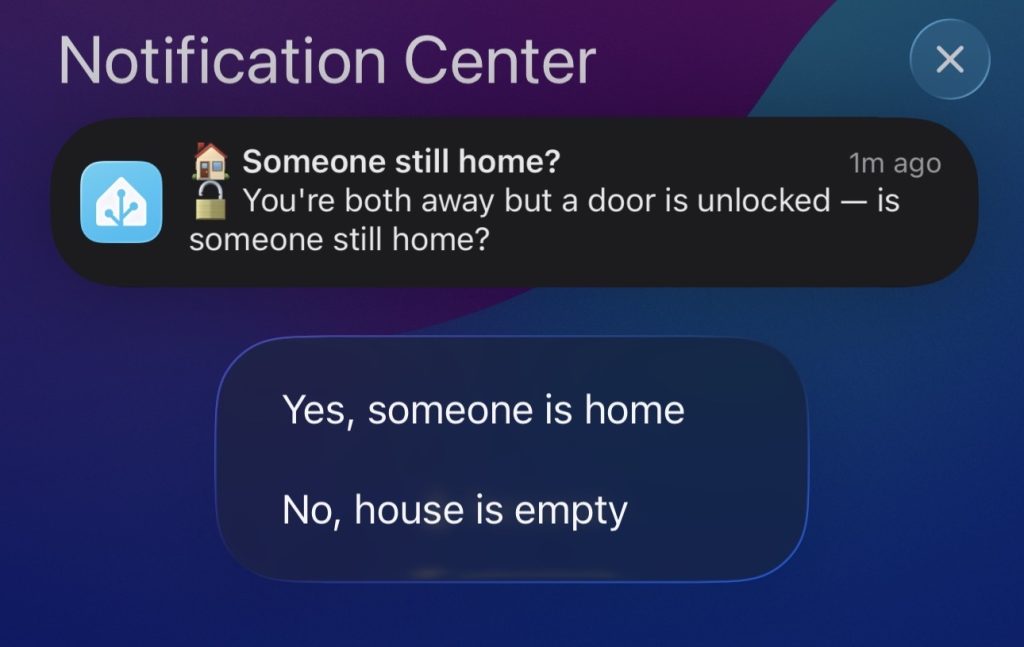
The first branch checks whether any entry door (front door, kitchen back door, garage man door) is unlocked. An unlocked door when both adults just left is a strong signal someone stayed behind. The automation immediately sends an actionable notification to both phones asking whether someone is still home, with Yes and No response buttons.
A second branch covers the case where all doors are locked. Here, the automation waits silently for up to two hours. If motion triggers on any interior sensor (office, basement stairs, mudroom, or upstairs landing), it asks the same question. If no motion occurs in two hours, it assumes the house is genuinely empty and does nothing.
yaml
alias: "Guest Home Check. Both Away"
description: >-
  When both YOURNAME and SPOUSENAME leave home, checks if someone might
  still be inside. If any entry door is unlocked, asks immediately via
  Companion notification. If all doors are locked, waits silently up to
  2 hours for interior motion before asking. Both branches wait 30 minutes
  for a Yes/No response. Yes sets the guest_home toggle so eco mode and
  away automations stay off.

triggers:
  - platform: state
    entity_id:
      - person.YOURNAME
      - person.SPOUSENAME
    to: not_home

conditions:
  # Both must be away before this fires
  - condition: state
    entity_id: person.YOURNAME
    state: not_home
  - condition: state
    entity_id: person.SPOUSENAME
    state: not_home
  # Only ask if guest mode is not already on
  - condition: state
    entity_id: input_boolean.guest_home
    state: "off"

actions:
  - choose:

      # Branch A: At least one entry door is unlocked, ask immediately
      - alias: "Entry door unlocked, ask now"
        conditions:
          - condition: or
            conditions:
              - condition: state
                entity_id: lock.YOURFRONTDOOR
                state: unlocked
              - condition: state
                entity_id: lock.YOURBACKDOOR
                state: unlocked
              - condition: state
                entity_id: lock.YOURSIDEDOOR
                state: unlocked
        sequence:
          - action: notify.mobile_app_YOURPHONE
            data:
              title: "🏠 Someone still home?"
              message: "🔓 You're both away but a door is unlocked, is someone still home?"
              data:
                tag: guest_home_check
                sticky: "false"
                actions:
                  - action: GUEST_YES
                    title: "Yes, someone is home"
                  - action: GUEST_NO
                    title: "No, house is empty"
          - action: notify.mobile_app_SPOUSEPHONE
            data:
              title: "🏠 Someone still home?"
              message: "🔓 You're both away but a door is unlocked, is someone still home?"
              data:
                tag: guest_home_check
                sticky: "false"
                actions:
                  - action: GUEST_YES
                    title: "Yes, someone is home"
                  - action: GUEST_NO
                    title: "No, house is empty"
          - alias: "Wait up to 30 minutes for a response"
            wait_for_trigger:
              - platform: event
                event_type: mobile_app_notification_action
                event_data:
                  action: GUEST_YES
                id: yes
              - platform: event
                event_type: mobile_app_notification_action
                event_data:
                  action: GUEST_NO
                id: no
            timeout:
              minutes: 30
            continue_on_timeout: true
          - choose:
              - alias: "Yes, enable guest mode"
                conditions:
                  - condition: template
                    value_template: "{{ wait.trigger is not none and wait.trigger.id == 'yes' }}"
                sequence:
                  - action: input_boolean.turn_on
                    target:
                      entity_id: input_boolean.guest_home
                  - action: notify.mobile_app_YOURPHONE
                    data:
                      message: clear_notification
                      data:
                        tag: guest_home_check
                  - action: notify.mobile_app_SPOUSEPHONE
                    data:
                      message: clear_notification
                      data:
                        tag: guest_home_check
            default:
              - action: notify.mobile_app_YOURPHONE
                data:
                  message: clear_notification
                  data:
                    tag: guest_home_check
              - action: notify.mobile_app_SPOUSEPHONE
                data:
                  message: clear_notification
                  data:
                    tag: guest_home_check

      # Branch B: All doors locked, wait silently for interior motion
      - alias: "All doors locked, wait for motion"
        conditions:
          - condition: state
            entity_id: lock.YOURFRONTDOOR
            state: locked
          - condition: state
            entity_id: lock.YOURBACKDOOR
            state: locked
          - condition: state
            entity_id: lock.YOURSIDEDOOR
            state: locked
        sequence:
          - alias: "Wait up to 2 hours for interior motion"
            wait_for_trigger:
              - platform: state
                entity_id: binary_sensor.INTERIOR_MOTION_SENSOR_1
                to: "on"
              - platform: state
                entity_id: binary_sensor.INTERIOR_MOTION_SENSOR_2
                to: "on"
              - platform: state
                entity_id: binary_sensor.INTERIOR_MOTION_SENSOR_3
                to: "on"
            timeout:
              hours: 2
            continue_on_timeout: false
          - condition: template
            value_template: "{{ wait.trigger is not none }}"
          # Double-check both are still away before asking
          - condition: and
            conditions:
              - condition: state
                entity_id: person.YOURNAME
                state: not_home
              - condition: state
                entity_id: person.SPOUSENAME
                state: not_home
              - condition: state
                entity_id: input_boolean.guest_home
                state: "off"
          - action: notify.mobile_app_YOURPHONE
            data:
              title: "🏠 Someone still home?"
              message: "👀 Motion detected inside while you're both away, is someone still home?"
              data:
                tag: guest_home_check
                sticky: "false"
                actions:
                  - action: GUEST_YES
                    title: "Yes, someone is home"
                  - action: GUEST_NO
                    title: "No, must be the dog"
          - action: notify.mobile_app_SPOUSEPHONE
            data:
              title: "🏠 Someone still home?"
              message: "👀 Motion detected inside while you're both away, is someone still home?"
              data:
                tag: guest_home_check
                sticky: "false"
                actions:
                  - action: GUEST_YES
                    title: "Yes, someone is home"
                  - action: GUEST_NO
                    title: "No, must be the dog"
          - alias: "Wait up to 30 minutes for a response"
            wait_for_trigger:
              - platform: event
                event_type: mobile_app_notification_action
                event_data:
                  action: GUEST_YES
                id: yes
              - platform: event
                event_type: mobile_app_notification_action
                event_data:
                  action: GUEST_NO
                id: no
            timeout:
              minutes: 30
            continue_on_timeout: true
          - choose:
              - alias: "Yes, enable guest mode"
                conditions:
                  - condition: template
                    value_template: "{{ wait.trigger is not none and wait.trigger.id == 'yes' }}"
                sequence:
                  - action: input_boolean.turn_on
                    target:
                      entity_id: input_boolean.guest_home
                  - action: notify.mobile_app_YOURPHONE
                    data:
                      message: clear_notification
                      data:
                        tag: guest_home_check
                  - action: notify.mobile_app_SPOUSEPHONE
                    data:
                      message: clear_notification
                      data:
                        tag: guest_home_check
            default:
              - action: notify.mobile_app_YOURPHONE
                data:
                  message: clear_notification
                  data:
                    tag: guest_home_check
              - action: notify.mobile_app_SPOUSEPHONE
                data:
                  message: clear_notification
                  data:
                    tag: guest_home_check

mode: single
Placeholders to replace:
YOURNAMEandSPOUSENAMEthroughoutYOURPHONEandSPOUSEPHONEwith your notify service nameslock.YOURFRONTDOOR,lock.YOURBACKDOOR,lock.YOURSIDEDOORwith your lock entity IDsbinary_sensor.INTERIOR_MOTION_SENSOR_1through_3with your interior motion sensor entity IDs. Add as many as you have
Resetting Guest Mode on Arrival
Guest mode needs to turn itself off when either adult comes home. Without this, it stays on indefinitely and your away automations never fire correctly after your next departure.
yaml
alias: "Guest Home. Reset on Arrival"
description: >-
  Turns off the guest_home helper when either YOURNAME or SPOUSENAME
  arrives home, restoring normal presence-based automation behaviour.

triggers:
  - platform: state
    entity_id:
      - person.YOURNAME
      - person.SPOUSENAME
    to: home

conditions:
  - condition: state
    entity_id: input_boolean.guest_home
    state: "on"

actions:
  - action: input_boolean.turn_off
    target:
      entity_id: input_boolean.guest_home

mode: single
How Away Mode Uses All of This
The guest mode helper is the key that connects presence to the automations that run your house while you are out. Any automation that should only run when the house is genuinely empty needs two conditions: both people away, and guest mode off.
Here is the pattern:
yaml
conditions:
  - condition: state
    entity_id: person.YOURNAME
    state: not_home
  - condition: state
    entity_id: person.SPOUSENAME
    state: not_home
  - condition: state
    entity_id: input_boolean.guest_home
    state: "off"
Add this block to your thermostat setback, lock-up, light shutoff, and security notification automations. All three conditions must be true before the house treats itself as empty.
What Is Coming Next: License Plate Detection
The car-specific conditions described above are good. Combining them with license plate detection will make them even better.
My plan is to upgrade my garage and driveway cameras to add license plate recognition, as previewed in the UniFi cameras and Home Assistant article. When my specific plate is confirmed in the driveway, that becomes a third confirmation layer alongside the phone zone entry and the vehicle-specific conditions. Edge cases that currently require the CarPlay or Tesla shift state checks will resolve more cleanly with a physical plate read as the anchor.
It also opens up a new category of departure automations. Right now my away logic depends on the phone leaving the zone. A plate read confirming the car physically left the driveway is a harder signal that handles the “phone left in the car” edge case cleanly.
I will write this up in full once the cameras are in and the automations have been proven over a few weeks.
A Note on Bluetooth Presence Detection
Bluetooth-based presence detection using devices like Raspberry Pis or ESPHome Bluetooth proxies is another layer worth knowing about, though I have not implemented it yet. The concept is that Bluetooth beacons placed around your home can detect when your phone is in range of a specific room or floor, giving you sub-zone presence data that phone GPS cannot provide.
For me right now, the practical blocker is the usual one for any home lab expansion: budget, time, and spouse and kids approval for dad to get the required play time. It is on the list. When I get there, I will write it up.
For now, the combination of Companion App geofencing, mmWave room sensors, car-specific conditions, and guest mode covers the vast majority of presence scenarios without additional hardware.
Alarmo Integration Is Coming
The next major addition to this presence detection foundation is Alarmo, a Home Assistant community add-on that turns HA into a full alarm system. It is one of the most capable and well-maintained security integrations in the ecosystem, and it connects directly to everything built in this blueprint.
Alarmo supports multiple arming modes (Armed Away, Armed Home, Armed Night, and Disarmed) and you configure which sensors trigger the alarm in each mode. Motion sensors, door contacts, and window sensors all feed into it. The presence detection layers built here map directly to those modes: both adults away with guest mode off is Armed Away, one adult home is Armed Home or Night depending on the time, and guest mode on keeps the system in a passive state that does not arm.
Auto-arm and auto-disarm are where presence detection really earns its keep. Alarmo can trigger arming automatically when both person entities leave the home zone, and disarm when either returns, using exactly the person entities and guest mode helper already set up in this blueprint. The CarPlay and Tesla conditions add another layer of confidence that the person arriving is actually the driver, not a passenger in someone else’s car, before the alarm disarms.
License plate detection is also on the Alarmo integration plan. A confirmed plate read combined with the person entity arriving home will be the cleanest possible disarm trigger: physical confirmation the right vehicle entered the driveway, not just a phone crossing a geofence.
The Write-Up Is Coming
The full Alarmo setup will get its own write-up once it is running and proven. Presence detection first, alarm integration second. That is the right order.
Smart Home Secrets is reader-supported. We may earn a commission if you buy through our links.