
What Home Assistant Voice Handles Locally, and What Still Needs an AI
📅 Published: May 2026 | ✍️ By Brad Andrews | ⏱️ 12 min read
When Kelly and I ran Google Home, broadcast was one of those features we actually used. During the newborn phase especially, one of us was almost always pinned down with a baby in our arms. Phone not always in hand. The other person might be downstairs grabbing something. A quick broadcast handled it. “Can you grab another bottle?” “Baby spit up, need diapers.” It was the kind of quiet, practical coordination that made a hard season a little easier.
Later, when I was commuting, I used Android Auto broadcast to let Kelly know I was getting close to home. Manual, but it worked. When we switched from Android to iPhone, CarPlay replaced Android Auto and that broadcast capability went with it.
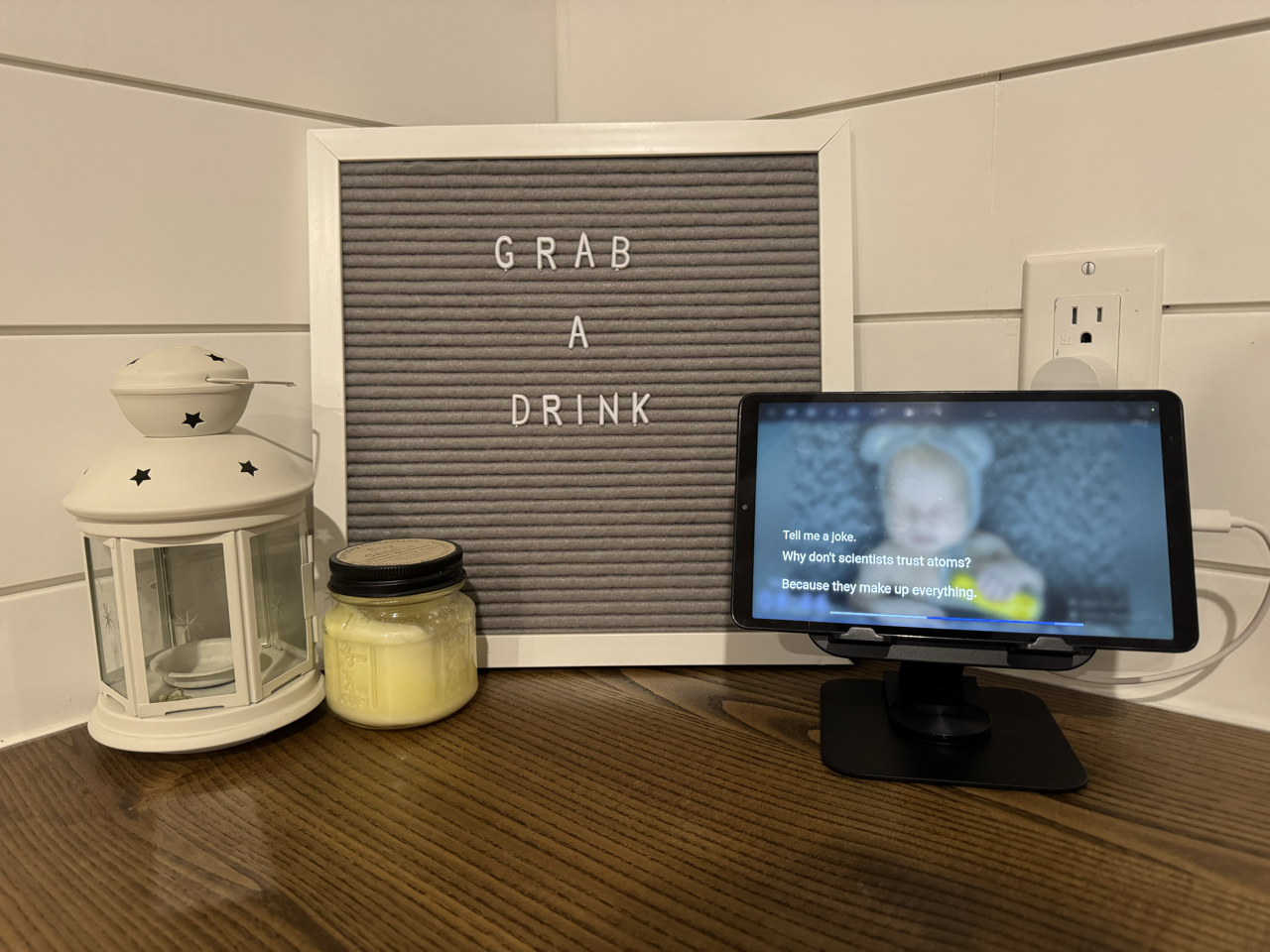
Google Home was already fading by then. In the months before the switch, we had quietly stopped using voice almost entirely. Google Assistant was getting noticeably worse as Google pushed Gemini, and I did not want Gemini listening in our house all the time. So the speakers sat mostly quiet. When my Lenovo Smart Display finally died, it was an easy decision. I covered the full switch in Blueprint #7, but the short version is: all the Google Homes came out, HA voice went in, and we are using voice more now than we ever did with Google.
Home Assistant had to step up.
One of the things I needed HA to replace was broadcast. My first instinct was to hand it to Claude, the conversation agent I had already set up for music, weather, and briefings. I spent a solid chunk of an afternoon writing prompt rules, testing phrases, iterating on instructions. The white speaker would respond. The Sonos speakers stayed silent every time.
I checked logs. I rewrote the broadcast rule. I added a CRITICAL instruction in all caps. Still nothing on the Sonos speakers.
Here is what was actually happening: Home Assistant’s built-in intent recogniser was intercepting the word “broadcast” before the command ever reached Claude. HA grabbed it, fired assist_satellite.announce on the nearest satellite, and considered the job done. Claude never saw a single broadcast request.
I felt pretty stupid when I figured that out.
But that moment turned out to be the most useful thing I learned about building a reliable voice setup. Because once I understood why HA grabbed “broadcast,” I understood the real question. Not “how do I get Claude to handle this better?” but “which commands should Claude handle at all?”
Google Home Set a Bar Worth Clearing
When people talk about replacing Google Home with Home Assistant, the conversation usually focuses on privacy and local control. Those are real benefits. But there is a practical question underneath: can HA actually do what Google Home does?
For broadcast specifically, Google Home handles it effortlessly. Say “Hey Google, broadcast dinner’s ready” and every speaker in the house plays it. The platform does not send that command to any AI for processing. It pattern-matches locally, extracts the message, fires TTS to every speaker. Fast because it is simple.
Home Assistant works the same way. It just does not advertise it.
HA has a built-in intent recogniser that handles dozens of commands locally without touching any AI. Turn on lights, set thermostats, lock doors, start timers. All local, all instant, all handled before any conversation agent gets involved. The full list of built-in intents is published in the Home Assistant developer docs and is worth a read before you decide what belongs in your conversation agent prompt.
The mistake I made, and it is an extremely common one based on what I see in the community, was defaulting to the AI for everything. If you have a conversation agent set up, it is tempting to put everything through it. It feels capable. But it is slower, it is cloud-dependent if you are using a hosted model, and it is less reliable for fixed-format commands than a local sentence trigger.
Understanding where the line falls changes how you design your whole voice setup.
The Decision Framework: Three Rules
After this experience, I can distill the local vs LLM decision into three rules.
Rule 1: Fixed format belongs local. If the command always produces the same type of output regardless of the input, a local sentence trigger handles it better than an LLM. “Broadcast dinner’s ready” should always fire TTS to all speakers. “Set a 10 minute timer for pasta” should always start a countdown. “Security check” should always read the same entity states in the same order. The output format never changes, so there is no value in running it through a language model.
Rule 2: Reasoning belongs to the LLM. If the response requires interpreting context, combining data from multiple sources, or making a judgment call, that is where Claude earns its place. Asking for the weather seems simple, but my weather rule checks temperature, wind speed, and conditions to decide whether to suggest swimming or the hot tub. That is reasoning. A local intent script can technically do it, but the LLM handles it more naturally and flexibly.
Rule 3: HA intercepts more than you think. The built-in intent recogniser grabs common phrases before the conversation agent ever sees them. “Turn on the kitchen lights,” “set a timer,” “broadcast.” All intercepted locally. This is a feature, not a limitation. But it means you need to design your trigger phrases deliberately. If you want Claude to handle something, make sure the phrase you use does not match a native HA intent.
The Decision Matrix
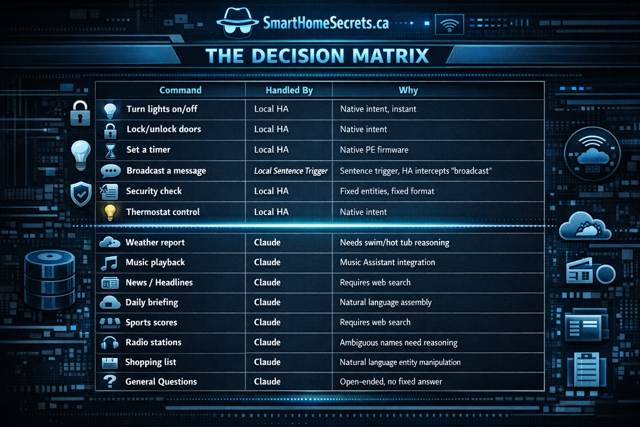
Here is how I break it down across my actual setup:
| Command | Handled By | Why |
|---|---|---|
| Turn lights on/off | Local HA | Native intent, instant |
| Lock/unlock doors | Local HA | Native intent |
| Set a timer | Local HA | Native PE firmware |
| Broadcast a message | Local sentence trigger | HA intercepts “broadcast” anyway |
| Security check | Local sentence trigger | Fixed entities, fixed format |
| Thermostat control | Local HA | Native intent |
| Weather report | Claude | Needs swim/hot tub reasoning |
| Music playback | Claude | Music Assistant integration |
| News/headlines | Claude | Requires web search |
| Daily briefing | Claude | Natural language assembly |
| Sports scores | Claude | Requires web search |
| Radio stations | Claude | Ambiguous names need reasoning |
| Shopping list | Claude | Natural language entity manipulation |
| General questions | Claude | Open-ended, no fixed answer |
The pattern is clear. If HA can answer with a lookup and a template, keep it local. If the answer requires assembling information from multiple sources, interpreting ambiguity, or adapting to context, that is an LLM job. If you are just getting start on your Home Assistant journey, do not worry, I wrote about that here in my Getting Started guide to help you get going.
What We Actually Built: Broadcast
The broadcast story is a good example of how the local approach works once you stop fighting it.
After I realised HA was intercepting “broadcast,” I stopped trying to fix the Claude prompt and built the solution that actually works: a sentence trigger automation that calls a dedicated script, which fires TTS to every speaker in the house simultaneously including tablets thanks to the community built Voice Satellite card, take a look at my other favourite add-ons here.
The script uses media_player.play_media with announce: true to hit all Sonos speakers and assist_satellite.announce to cover the satellite devices. The announce: true flag is what makes it work. It temporarily interrupts whatever music is playing, speaks the message, then restores playback automatically. That is the same behaviour Google Home broadcast has always had. It took a while to figure out, but it works the same way now.
One place this immediately beats Google Home is flexibility. Google broadcast goes everywhere or nowhere. With this script, you choose exactly which speakers are included. I have Sonos speakers both inside and outside. My broadcast only targets the indoor speakers. The outdoor deck and pool speakers stay out of it unless I specifically want them included. If you want to broadcast to a display tablet, two Sonos speakers, a Voice PE, a Chromecast, and an AirPlay speaker all at once, that is just a matter of adding entity IDs to the list. No locked ecosystem, no walled garden, no waiting for Google to support your device. Any media player entity in Home Assistant is a valid target.
Here is the broadcast script. Place this in your /config/scripts/ folder if your configuration.yaml uses script: !include_dir_merge_named scripts:
yaml
broadcast_message:
  alias: Broadcast Message
  description: Broadcasts a spoken message via Piper TTS to Sonos speakers and satellite devices.
  mode: parallel
  max: 3
  fields:
    message:
      name: Message
      description: The message to broadcast throughout the house
      required: true
      selector:
        text: {}
  sequence:
  - variables:
      tts_url: "media-source://tts/tts.piper?message={{ message | urlencode }}&language=en_US&voice=en_US-libritts-high"
  - parallel:
    - alias: Announce on satellite
      action: assist_satellite.announce
      data:
        message: '{{ message }}'
      target:
        entity_id: assist_satellite.YOUR_SATELLITE_ENTITY
    - alias: Announce on Sonos speakers via Piper TTS
      action: media_player.play_media
      data:
        media_content_id: '{{ tts_url }}'
        media_content_type: audio/mp3
        announce: true
      target:
        entity_id:
        - media_player.YOUR_MAIN_SONOS
        - media_player.YOUR_BEDROOM_SONOS
        - media_player.YOUR_MEDIA_ROOM_SONOS
        - media_player.YOUR_ENSUITE_SONOS
        - media_player.YOUR_OFFICE_SONOS
Replace YOUR_SATELLITE_ENTITY with your assist satellite entity ID, found under Settings, then Devices and Services, then your Voice Satellite integration. Replace each YOUR_X_SONOS placeholder with the entity ID of your Sonos speaker, found under Settings, then Devices and Services, then Sonos.
One important note on script file location. If your configuration.yaml uses script: !include_dir_merge_named scripts, the script above goes in your /config/scripts/ folder, not in a root scripts.yaml file. API-created scripts go to .storage and will not load from the folder. If a script is not showing up after a restart, that is almost certainly why.
Here is the sentence trigger automation that calls the script:
yaml
alias: Broadcast Voice Sentence Trigger
description: >
  Local sentence trigger for broadcast commands. Calls script.broadcast_message
  directly without going through the conversation agent.
mode: parallel
max: 3
trigger:
  - platform: conversation
    command:
      - "broadcast {message}"
      - "broadcast to the house {message}"
      - "announce to the house {message}"
      - "house announcement {message}"
action:
  - action: script.broadcast_message
    data:
      message: "{{ trigger.slots.message }}"
  - set_conversation_response: "Broadcast sent."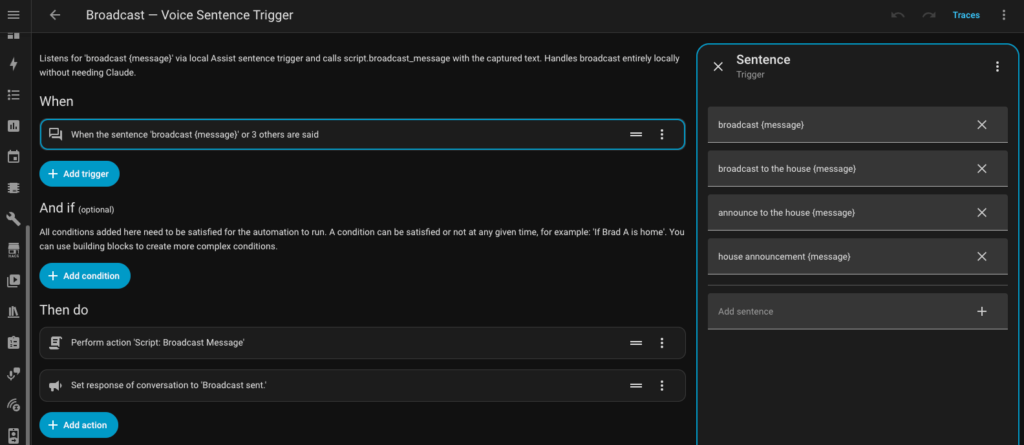
Why “Broadcast” Stayed Local
You might notice “broadcast” appears in the sentence trigger phrases above. That works because the sentence trigger automation registers before HA’s default intent matching runs for custom phrases. When you say “broadcast dinner’s ready,” HA matches it to the custom sentence trigger and calls the script.
What does not work is trying to get Claude to respond to “broadcast.” HA grabs it before Claude sees it. So if you want your conversation agent to handle something, choose a phrase that does not match any native HA intent. “House announcement” is one example. HA has no native intent for that phrase, so it passes through to Claude intact.
This is worth testing for any phrase you plan to use with your conversation agent. Go to Developer Tools, then use the sentence parser to check whether HA matches the phrase locally before it reaches your agent.
What This Replaced, and What It Added
The manual coordination broadcast Kelly and I used during the newborn years is fully back. One of us in the kitchen, the other upstairs with a kid, need something grabbed from the garage. Say it once to the nearest satellite and every speaker in the house plays it. Same concept, better execution.
The “I am almost home” broadcast I used to send manually from Android Auto is now fully automatic. When I exit the zone around my office, the HA companion app triggers an automation that announces to the house that I am on my way. No manual step, no phone in hand required. That one change alone is a good example of how HA does not just replace what Google Home did. It improves on it.
But the things we have added are where it gets interesting.
The kitchen counter switches are double-tap enabled via Z-Wave. A double tap on the top announces upstairs, a double tap on the bottom announces downstairs. The message adapts to the time of day: “breakfast is ready” before 10am, “lunch is ready” midday, “dinner is ready” in the evening. No voice command needed. One physical tap handles the whole thing.
We have scheduled school morning announcements: “time to get dressed,” “ten minutes until we leave,” “shoes on.” Those fire automatically on school day schedules. No reminder needed from either of us. The house handles it.
We also use Ubiquiti Unifi cameras for AI based detections and that integrates nicely into Home Assistant as well, yay for the community behind HACS. Here is how I have setup my Unifi cameras to integrate smart detections like person in backyard when not home and package detection replicating an Amazon Alexa but with support for more than just Amazon packages.
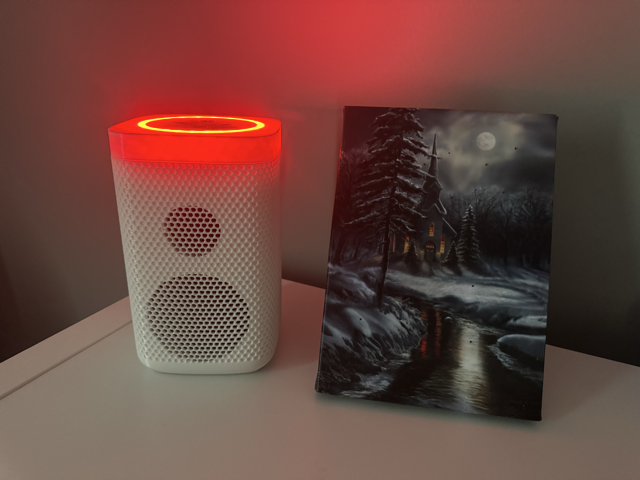
Bedtime is the one I am most pleased with. Thirty minutes before bedtime, the LED rings on all the satellites flash red, a visual signal the kids have learned to recognise. When bedtime hits, the rings go solid red and the house announces it is time to get ready for bed. It reinforces the routine without us having to say it every single night.
Then there was dinner.
The night I finished setting this all up, the kids discovered they could type messages into the HA app and broadcast them through the house. What made it click for them was the voice. It is not a recording of Kelly or me. It is the house speaking in its own voice. That distinction matters more than I expected.
I started it. I broadcast a message telling my son the house was stealing his name and would now be called by his name forever. He thought that was hilarious and immediately broadcast back that the house absolutely could not steal his name. Then things escalated the way they always do with kids. Aubrey broadcast that dad stinks. Wesley agreed and added some detail. Someone told the house to say mom is the best and so pretty, which Kelly appreciated. And then, inevitably, because there are children involved, the house announced “poop” to the entire main floor.
Everyone lost it.
It was the first time the whole family genuinely played with something I built. That is the bar Google Home set. Home Assistant cleared it.
The Voice Quality Question
One honest note on Piper TTS: it is good, not perfect. The voice I am running is en_US-libritts-high. Eight or nine times out of ten the kids do not notice it is a robot. When the house is loud, the pronunciation can get muddied enough that someone misses a word. It is a real tradeoff worth knowing before you commit.
If voice quality is critical for your household, it is worth testing Piper against HA Cloud TTS before going fully local. HA Cloud TTS is noticeably smoother. The tradeoff is cloud dependency and a Nabu Casa subscription. For our house, local Piper is the right call. Your priorities might land differently.
What Is Next
This article covered the architecture decision between local and LLM, and why it matters. The next article in this series goes deep on one of the trickiest pieces of the local voice puzzle: timers on the Voice PE.
Timers seem simple until you try to get them working consistently across satellites, tablets, and the Voice PE, with a display overlay on the kitchen tablet and proper notifications when they finish. There are real limitations in how the Voice PE handles timers internally, and the community solution involves ESPHome YAML modifications most guides do not cover.
That is the next one. For now you may want to take a look at how I setup a Home Assistant kitchen display with local voice to replace Google.